Aikyashree Scholarship 2026: Track Your Application Status

Submitting your Aikyashree Scholarship application is only the first step. What happens between submission and the final credit of funds to your bank account involves multiple verification stages — each requiring action from different authorities. If any one stage stalls, the scholarship amount will not be disbursed until the issue is resolved.

Students who check their status regularly can:

  • Identify quickly if their application is stuck at the Institute Verification stage
  • Act immediately if their application is rejected and reapply within the deadline
  • Know exactly when to expect funds in their bank account
  • Avoid unnecessary anxiety caused by not knowing where their application stands

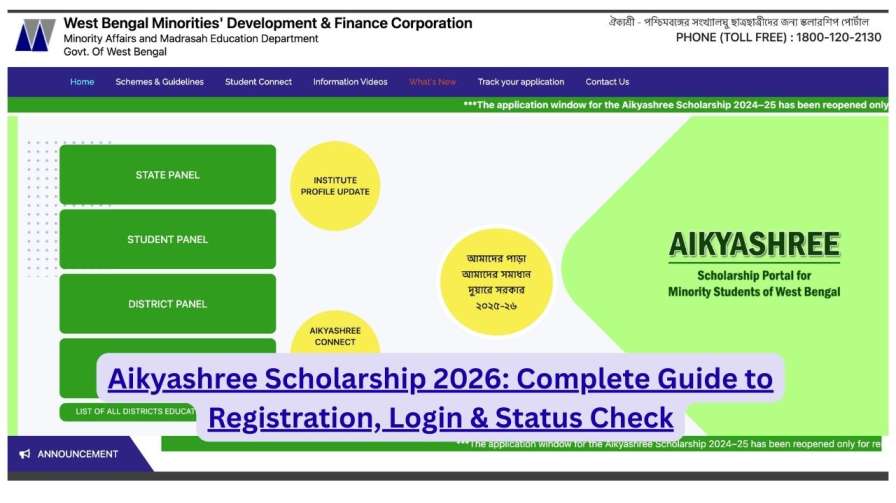
The WBMDFC (West Bengal Minorities Development and Finance Corporation) has built a real-time tracking system directly into its portal at wbmdfcscholarship.in, which means you do not need to visit any office or speak to any agent to find out your current application status.

What You Need Before You Begin

Before opening the portal, keep the following details ready on paper or on your phone. You will need them to access the tracking page:

Required Information:

  • Application ID / Reference Number — This was generated at the time of registration. It is a unique identifier for your application. If you have misplaced it, check the SMS or email sent to you during registration, or look at the confirmation page you were asked to download after locking your application.
  • Registered Mobile Number — The mobile number linked to your application at the time of registration.
  • District — The district where your school or college is located (not your home district).
  • Date of Birth — Required on some login screens.

Did not save your Application ID? If you cannot locate your ID, try logging in using your Date of Birth and District combination on the Student Login page. Alternatively, contact your institution’s scholarship coordinator — they have access to submitted application records.

Two Ways to Check Aikyashree Scholarship Status

The WBMDFC portal offers two distinct methods to track your application. Both are equally reliable and draw from the same live database.

Method 1 — Via Student Login Dashboard

Log in to the portal using your Application ID and Date of Birth. Your application status, along with every stage it has passed through, is displayed directly on your personal student dashboard. This method gives you the most comprehensive view of your application history.

Method 2 — Via the Track Application Feature (No Login Required)

This is the faster option if you just want a quick status update without navigating through a full login. No password is needed — only your district, Application ID, and Date of Birth.

Both methods access the same data. Use whichever is more convenient.

Step-by-Step: How to Track via Official Portal

Follow these steps exactly. Do not use any third-party websites that ask for your Application ID — only use the official WBMDFC portal.

Step 1: Open the Official Portal

Open any browser on your phone or computer and navigate to:

wbmdfcscholarship.in

Wait for the page to load fully. If the site loads slowly, try clearing your browser cache or switching to a different network.

Step 2: Find the Status Tracking Section

On the homepage, look for one of the following options in the main navigation menu or the central banner area:

  • “Track Application Status”
  • “Track Application”
  • “Applicant Login”

Click on the relevant option. You will be directed to the tracking page.

Step 3: Enter Your Credentials

On the tracking page, carefully fill in the following fields:

  • District: Select the district where your school or college is located from the dropdown list.
  • Application ID / Reference Number: Type in the unique ID you received during registration. Ensure there are no extra spaces before or after the number.
  • Date of Birth / Mobile Number: Enter the date of birth or mobile number linked to your application.
  • Security Captcha: Type the letters or numbers shown in the verification image. If the captcha is unclear, click the refresh icon next to it to generate a new one.

Step 4: Click Submit or Track

After filling in all fields correctly, click the “Track” or “Submit” button. Within a few seconds, your application dashboard will load.

Step 5: Read Your Current Status

Your screen will display your application’s current status prominently. Note it down. Scroll further to see a complete stage-by-stage history of where your application has been and what action was taken at each level.

Understanding Every Status Message

The portal uses specific status labels that indicate exactly which stage your application is currently at. Many students misread these messages and panic unnecessarily — or, conversely, assume everything is fine when action is actually required. Here is what each status genuinely means:

Status MessageWhat It MeansAction Required?
Application SubmittedYour application has been recorded in the systemNone — wait for institute to verify
Under Institute VerificationYour school/college has not yet verified your application on the portalYes — visit your institution
Institute VerifiedYour school/college has completed their verification stepNone — wait for district review
Under District ReviewThe district authority is examining your applicationNone — this takes several working days
Approved by DistrictThe district office has cleared your applicationNone — funds are being processed
Sent for PaymentYour application has been forwarded to the payment processing authorityNone — payment is being prepared
DisbursedThe scholarship amount has been credited to your registered bank accountCheck your bank account
RejectedYour application has been declined — a reason is statedRead the reason carefully and act accordingly
Pending at State LevelApplication is under review at the state authorityNone — wait for clearance
On HoldApplication is paused due to a data mismatch or pending documentContact the helpline or your institution

Application Stuck? Here Is What to Do

The most frustrating situation scholarship applicants face is an application that appears frozen at one particular stage for weeks or months. Here is how to handle the most common stuck scenarios:

Stuck at “Under Institute Verification”

This is the most frequently reported issue. It means your school or college has not logged in to the WBMDFC portal to verify your application.

What you should do:

Visit your institution’s administrative office in person. Ask to speak with the designated Scholarship Coordinator or the Principal. Request them to log in to the WBMDFC portal and complete the verification for your application. Bring your Application ID with you so they can locate your record quickly.

Be polite but persistent. If you are told it will be done “soon,” follow up again within three to five working days.

Stuck at “Under District Review” for Over Three Weeks

District offices handle a large volume of applications simultaneously. Some delay is normal. However, if it has been more than three weeks with no update, contact the district scholarship office directly. Your institution’s coordinator can provide the contact details for your district’s WBMDFC office.

Status Changed to “Rejected”

Read the rejection reason carefully on the portal. Common rejection causes include:

  • Aadhaar-bank account mismatch — the name on the bank account does not exactly match the Aadhaar
  • Blurry or unreadable document uploads
  • Income certificate irregularities
  • Institute not recognized under the WBMDFC approved institution list
  • Duplicate application — applying for two scholarship schemes simultaneously

If you believe the rejection is an error, contact the WBMDFC helpline at 1800-120-2130 with your Application ID and the rejection reason in hand.

Status Shows “Disbursed” But No Money Received

This situation has a straightforward set of possible causes:

  • Your bank account number or IFSC code was entered incorrectly during application
  • Your Aadhaar is not correctly linked to your bank account
  • Your bank account has been dormant and is not accepting credits
  • The transfer is in process and may take 2–5 working days to reflect

Cross-check your bank account details on the portal against your physical passbook. If there is a discrepancy, call the helpline immediately — do not wait.

How to Track Renewal Application Status {#renewal-status}

If you are a returning scholarship recipient who has submitted a renewal application, the status tracking process is identical to tracking a fresh application. Use the same portal — wbmdfcscholarship.in — and enter the same Application ID from your most recent renewal submission.

One important distinction: renewal applications go through an additional step where the system verifies that your academic performance meets the required minimum percentage (typically 60% for SVMCM and similar merit-cum-means schemes). If this verification fails, your renewal will not proceed regardless of other approvals. Ensure your marksheet was uploaded correctly and that the marks stated in your application match those on the uploaded document exactly.

When Will the Money Be Credited?

A common question among applicants is: how long does it take to receive the scholarship after status shows “Disbursed”?

Here is a general timeline based on how the process works:

  • Application to Institute Verification: Depends on how quickly your institution acts — typically 1–4 weeks
  • Institute Verified to District Approval: Usually 2–6 weeks
  • District Approved to Sent for Payment: A few working days to 2 weeks
  • Sent for Payment to Disbursed: 3–10 working days
  • Disbursed to Money in Bank Account: 1–5 working days (depends on your bank)

Overall, from the date of submission to fund receipt, the process typically takes 8 to 16 weeks — though this varies significantly based on how promptly your institution and district office act on their steps.

The single biggest delay factor, consistently, is the Institute Verification stage. Follow up with your institution regularly to ensure they do not overlook your application.

Frequently Asked Questions

Q1. I lost my Application ID. Can I still check my status?
Try logging in through the Student Dashboard using your registered mobile number, Date of Birth, and District. Alternatively, contact your institution’s scholarship coordinator — they have access to application records and can retrieve your ID.

Q2. My status has not changed in over a month. Should I reapply?
Do not reapply unless your application has been officially rejected. An unchanging status typically means the verification stage is pending — follow up with your institution or district office. Submitting a duplicate application may disqualify you.

Q3. The portal is showing an error every time I try to check. What should I do?
WBMDFC portal maintenance is typically scheduled late at night or early morning. Try accessing the portal between 6 AM and 10 AM. If the error persists for more than 48 hours, call the toll-free helpline at 1800-120-2130.

Q4. My status shows “Disbursed” but I received less money than expected. Why?
The amount disbursed is determined by the scholarship category assigned to your application and is calculated on a pro-rata basis in some cases. Review the scheme details under your student dashboard to see the exact breakdown. Contact the helpline if the amount seems significantly incorrect.

Q5. Can I check the status for a family member’s application?
Yes, as long as you have their Application ID, Date of Birth, and District. The portal does not restrict who can perform the status check — you just need the correct credentials.

Q6. My application shows “Institute Verified” but I received no OTP or notification. Is it progressing?
Yes. Status updates on the portal are not always accompanied by SMS alerts. “Institute Verified” means the process is moving forward — no action is needed on your part at this stage.

Q7. How do I know which district to select during status tracking?
Always select the district where your school or college is located — not your home district. This was also the district you selected during the original application submission.

Q8. Is checking status on the WBMDFC portal free?
Completely free. No login fee, no OTP charge, no agent required. Any website or person asking you to pay for status information is attempting to defraud you.

Scroll to Top